Tuesday, 2 May 2017

Bitdefender Internet Security 2017 – A Complete Security Suite for your Device

Bitdefender is not a new player in the world of internet security solutions. It has been providing the best security solutions since 2001. If you are in search of the best security suite for your device then Bitdefender Internet Security 2017 is the one to come to your rescue. It is the latest security solution developed by Bitdefender to protect your system against malware, ransomware, and other aggressive attacks by third-party applications. Let us explore more about it below.

About Bitdefender Internet Security 2017

From the antivirus protection and internet security to the total security of multi-devices, Bitdefender has never disappointed its users. It is using the same malware scanning technology, sharing a compact interface, and has a minimal impact on the system’s performance. Bitdefender Internet Security 2017 is the latest security suite launched by Bitdefender for its old and new users. It can turn out to be a cost-effective solution for the users looking to aid their devices with a trusted security shield.
internet security

Learning about the Features of Bitdefender Internet Security 2017

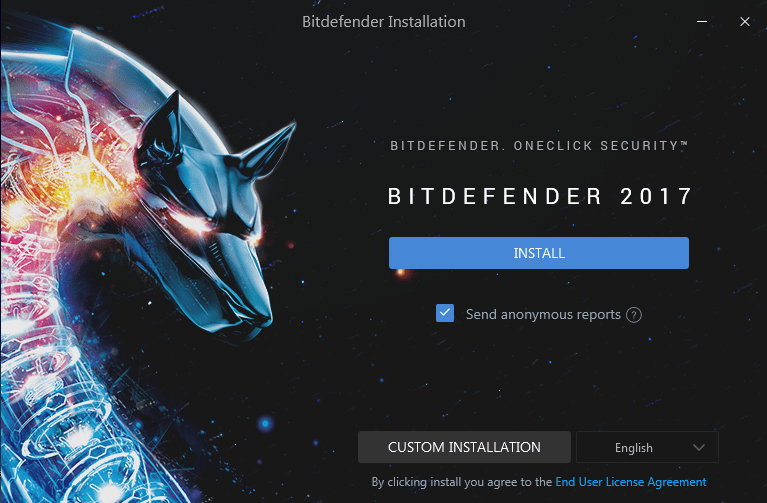
You first need to download and install the software on your device to discover what’s new in this security solution by Bitdefender.
secure
After the installation is completed, you will be asked to create an account with Bitdefender. Fill in the details carefully and signup for the account.
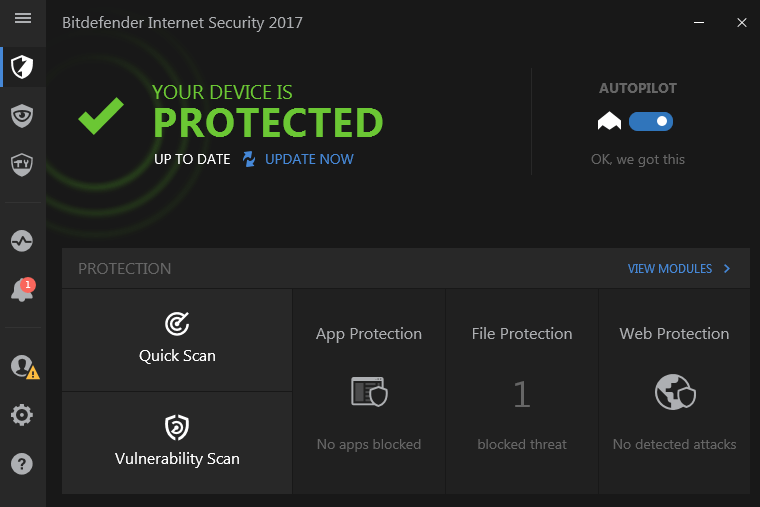
protected

Quick Scan

You can click on the ‘Quick Scan’ option for scanning your device against any malware quickly. It will detect any active threats and help you in resolving any issues.
scanning 1scanning 2

Vulnerability Scan

It will find all the vulnerabilities that might let malware to infect your system. It checks for the files that need update and are at risk to be attacked by malware.
vulnerabilities
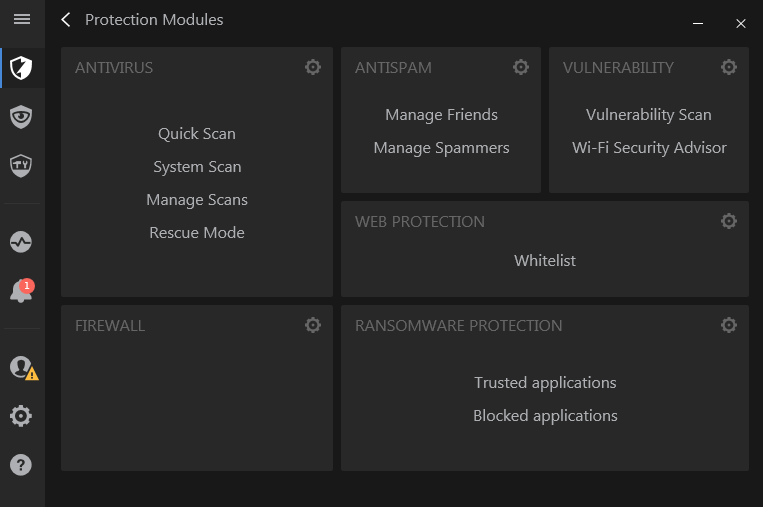
  • You can click on ‘View Modules’ to discover more options.
view modemode 2

Firewall

Bitdefender Internet Security 2017 has an inbuilt firewall to provide extra protection to your network from any intruders trying to enter into your system through your network.
  • Go to Firewall settings and turn on the ‘Block Port Scans in Network’ option.
network options
  • Go to ‘Adapters’ and turn on the Stealth Mode and Generic. This might slow down your internet speed a bit.
speed bit

Antivirus

Bitdefender Internet Security 2017 has integrated the antivirus along it to provide an added protection to your device.
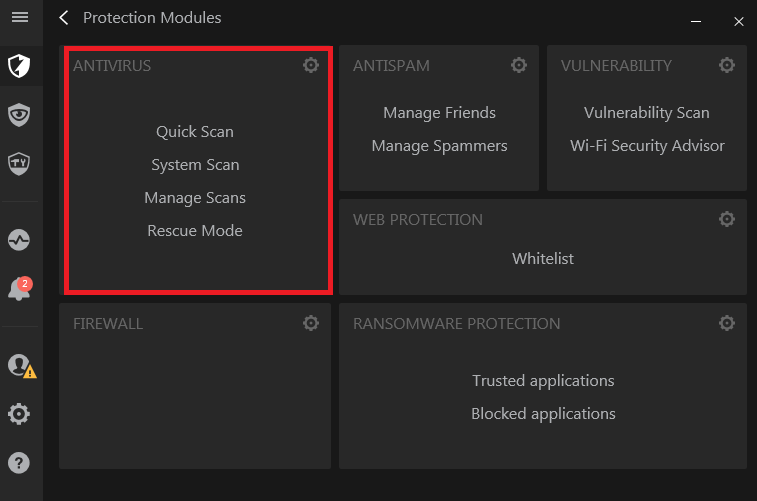
  • Click on ‘Antivirus’ option.
options to check
  • The on-access scanning and active threat control is switched to ‘on’ by default.
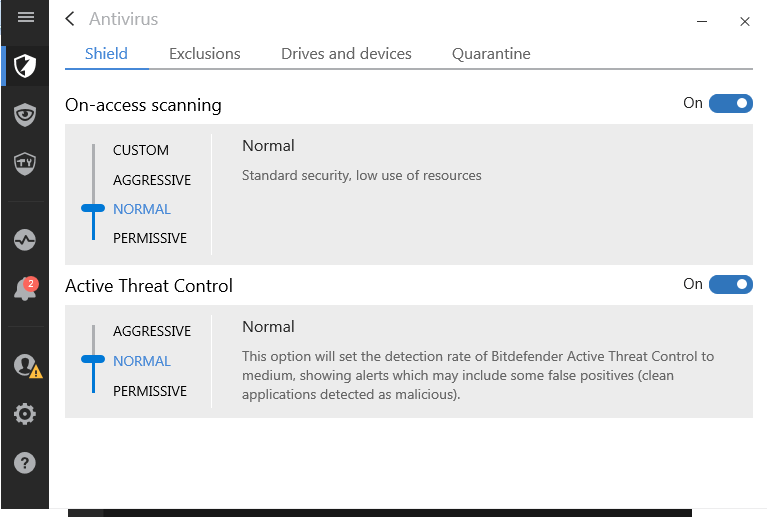
switched on
  • You can add the list of files and folders that you want to exclude from the scanning process in the ‘Exclusions’ option.
exclude option
  • The ‘Drives and Devices’ option helps you to manage the scanning of CD/DVD devices, USB devices, and other devices mapped to your network drives.
auto scan
  • You can add the files/folders that you want to be rescanned after the virus definitions have been updated. Go to ‘Quarantine’ option and add the desired files/folders to it. Do not forget to turn on the option. Quarantined files can be resubmitted for further analysis.
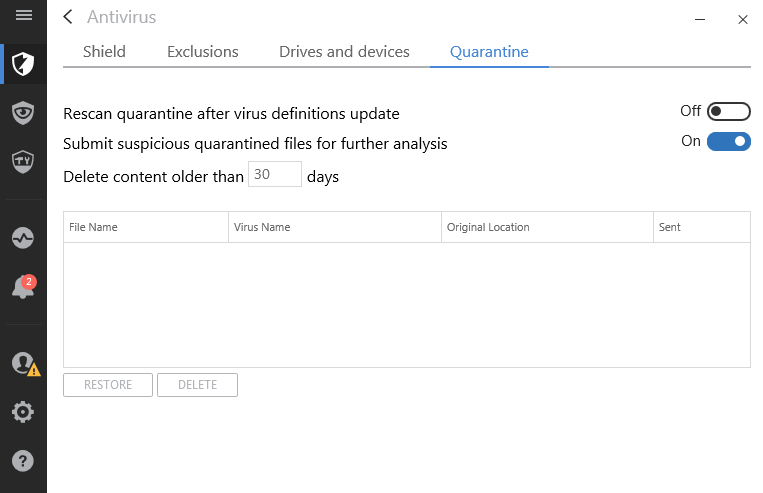
shield

Ransomware Protection

The ransomware protection makes it easy to place your sensitive documents under a special protection from malicious encryption programs which may demand the ransom on the personal files.
  • Click on ‘Ransomware Protection’ option.
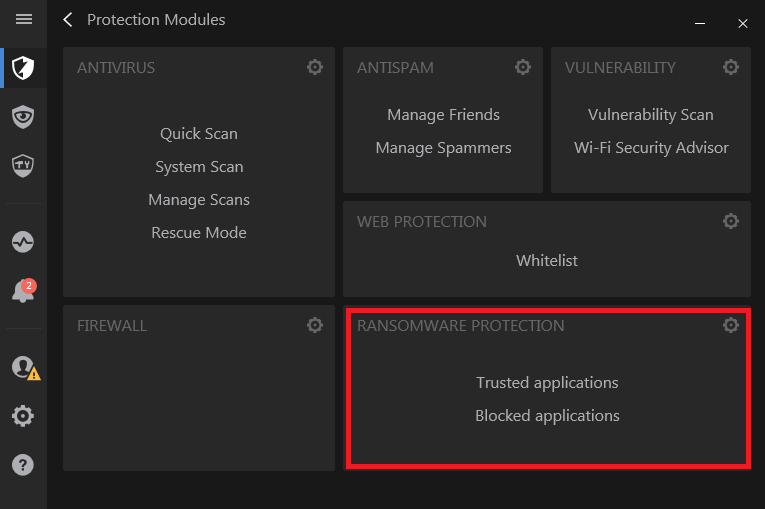
trusted option
  • It is ‘off’ by default. You need to turn it on.
shield
  • Now, you can choose to add or remove the files/folders from the list. In this way, you can easily protect the personal files from getting encrypted and held for the ransom.

Safepay & Parental Advisor

Bitdefender’s secure Safepay browser is optimized to deliver a good browsing, shopping, and banking experience. Its password manager comes handy at times of filling the credit card details automatically.
  • Go to ‘Privacy’ option.
privacy
  • Click on ‘Safepay’ option to proceed with secure browsing.
  • The ‘Parental Advisor’ option is tailored for the parents who want to keep an eye over the activity of their kids.

Monitor the Activities on your Device

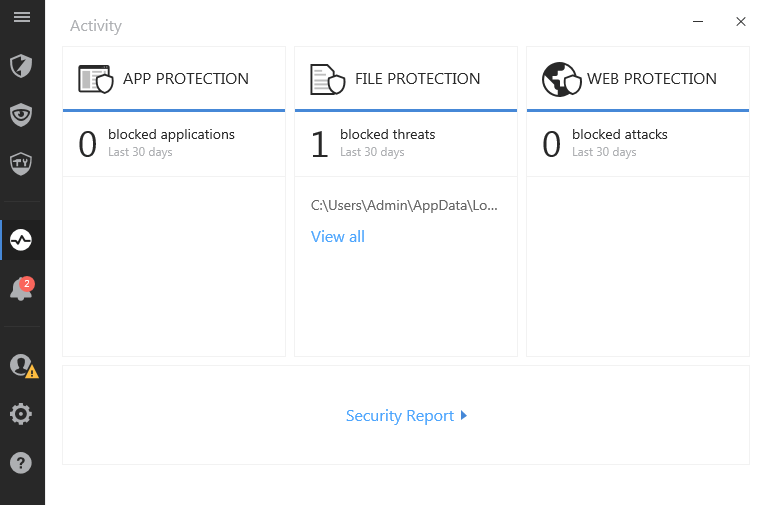
You can click on ‘Activity’ option to monitor the things happening on your device. Bitdefender will be activated as soon as you turn on your device and will keep a track of all the activities on your device, protecting it from malware and viruses.
devicesprotection
You can click on ‘Security report’ to get the reports for whole week.
reports

Pricing

Bitdefender Internet Security 2017 is the most affordable security suite that helps you to stay safe and keep your device malware free. You can use it simultaneously on 3 devices under one subscription plan.

Pros

  • Added Ransomware protection & in-built firewall
  • Low impact on the system
  • Affordable Pricing

Cons

  • No online storage or VPN
The Bottom Line
Bitdefender Internet Security 2017 is surely the most secure and most powerful antivirus suite one can use for different devices. The effective malware protection, ransomware protection, secure-browsing, in-built firewall, and a number of exclusive features ensure that your devices and privacy are in good hands. You must try it today!

Best Free 4K Video Downloader | An Easy Way To Download Any Video

4K Video Downloader is a free tool which can be used in downloading videos from some widely used sites like Facebook, Flicker, Youtube, etc. It can download videos in various video and audio formats along with subtitles. It also downloads videos in some high-quality formats. Various features are needed to be discussed about it, and we will discuss it in below part of this post.


4K Video Downloader | Features

media grabber
4k Video Downloader is highly rated 4K company product which is available for almost all platforms it supports Mac, Windows, and Ubuntu. Now before moving further let us highlight some of its key features.
1) 4k Video Downloader makes it users to download HQ videos and audio from some famous sites. It supports some sites like Vimeo, Youtube, SoundCloud, Flickr, Facebook and DailyMotion.
2) It download videos in some HQ formats like HD 1080p, HD 720p or 4K and it even supports 8K videos.
3) It downloads videos and audios in some widely used videos and audios formats like MP4, MKV, M4A, MP3, FLV, 3G. It can also download playlist in .m3u format.
4) It can also be used in downloading subtitles if they are available.
5) It also downloads 360 degrees videos, and users can actually see different angles in videos by dragging the mouse to see different angles.
6) 4K Video Downloaders comes with some useful features for YouTube lover. Users can download entire videos playlist through one click, and it also downloads new videos of subscribed YouTube video channels.
7) Smart Mode option is also there to save a lot of time user. It can be used to preselect the format and other properties of videos.

Downloading a 360 degree YouTube video.

Let us give a quick demo in which we are using 4K Video Downloader for Windows to download 360 videos from YouTube.
1) Using 4K Video Downloader is quite simple and doesn’t require many efforts in understanding the working. Just open the browser and open the video in YouTube. And after that copy the URL of that video.
racing sound
2) After copying the URL of the video open the 4K Video Downloader software and you will get the following screen and just paste the link.
paste the link
3) After that system will ask for the format of the video. Choose that format according to your requirements.
auto grabber
4) Choose the Video format, destination folder and start the download.
5) Within few seconds video will be downloaded in the destination folder. Open the folder and play the video.
windows 10 media6) You can always adjust the smart mode through which you can pre-set the properties of the videos.
7) Use can also change some preference setting of the tool just by clicking on preference option, and you will get the following screen on your system.
settings and preference
8) Use the tool yourself to explore more about its working.
Ending Up
We have to wrap up here, and before going, we would like to tell some pros and cons of 4K Video Downloader to our readers. Read all points carefully and then take discussion accordingly.
Pro:
1) The tool is light and smoothly runs on the system without affecting the performance of the system. The videos download speed is good and video downloading starts within few seconds only.
2) It has elegant and clean and easy to use interface. Anybody can start using it within first use without wasting any time on understanding its functionality.
3) 4K Video Downloader can download videos in various high-quality formats, and even it supports 360 degrees videos which is excellent for a free tool.
4) The subtitle download feature is missing in most of the software of the same type even in the case of paid tools also.
5) Automatic subscribed channels videos download and whole playlist downloads these two features are new and yes very exciting.
Cons:
We haven’t found any drawback of this free software yet.
Final Thought
If you are looking for video downloading software through which you can download videos from famous sites like YouTube, Facebook, Flicker, etc. then 4K Video Downloader is for you only. Use it to download videos from net and share videos with your friends.

Saturday, 19 July 2014

MAGIX Music Maker 2014 Premium 20 With Keys Download

MAGIX Music Maker 2014 Premium 20 With Keys Download
MAGIX Music Maker 2014 Premium 20 With Keys Download

About MAGIX Music Maker 2014 :

Simply combine loops using drag & drop and create your own hit tracks in a matter of minutes.
Connect a microphone, guitar or keyboard and make your own recordings in studio quality. There's no limit to the creative possibilities

NEW! MAGIX Soundpools : MAGIX Music Maker 2014 Premium features over 5000 new loops & sounds from the genres of Rock Pop, Hip Hop, Dance, Techno, Chillout, Dubstep, House, Metal, Electro and Movie Score. An additional 1000 top sounds are available online.

NEW! Practical Pitch Wizard : The new Pitch Wizard helps you to choose the right pitch for your project. This makes it easy for you to keep the harmonies in tune even if you don't have the musical know-how. Your songs will always sound like they came straight out of a professional studio!


IMPROVED! Redesigned recording feature : The recording function in MAGIX Music Maker 2014 Premium has been reworked and simplified. Great recordings can now be achieved even faster enabling you to capture your ideas before the inspiration slips away. Simply record your vocals or an instrument such as guitar, bass or keyboard on one track and move on with ease to record the next one.

NEW! Vocal Tune - no more wrong notes : With the addition of Vocal Tune to MAGIX Music Maker 2014 Premium, the program now has a powerful tool for editing pitch. Based on ProAudio Technology, Vocal Tune offers convenient control and guarantees reliable correction of off-key notes in vocal recordings or from solo instruments while maintaining the natural sound character.

Vandal SE - The guitar and bass amp with authentic sound : Vandal SE is a guitar and bass amplifier with unbelievable sound fidelity and lots of effects for a fantastic rock sound just like pros! TIP! Why stop at rock? Vandal SE is perfect for other styles of music too. Try experimenting with the Vandal SE on pianos, synths, or drums to get a completely unique sound for any genre.

Produce your own tracks in your own style – with combinable soundpools, Vita Solo Instruments and the new DN-e1 synthesizer there's no limit to how creative you can be.

NEW! DN-e1 - A spectacular high-end synthesizer : Add some massive electro sounds to your tracks with the DN-e1 virtual analog synthesizer. This high-end synth enables you to generate thick, dynamic sounds quickly and easily. The DN-e1 is a unique addition to the realm of virtual analog synthesizers with unparalleled sounds for melodies and soundscapes and almost limitless possibilities for creative sound design.

Vita 2 - Limitless instrument variety with the ultimate sample player : The Vita 2 sample player is the fastest and easiest way to create your own unique, realistic instruments and add them to your arrangements. With a wide range of integrated filters and effects like delay, reverb and a tube distortion section, this powerful workhorse offers complete control of all your instrument compositions in one easy-to-use interface.

BeatBox 2 - Build your own beats : The Beat Box 2 drum machine is ideal for creating pulsating beats and infectious grooves. BeatBox 2 has it all – dynamic drum kits, unlimited possibilities for sound shaping, high-quality effects, and much more. The tried and tested BeatBox step principle is fun and quickly provides exciting results. Whether you're a pro or a beginner, it's never been easier to build complex and layered beats! 

Drum Engine - Perfect percussion : With the Drum Engine you can create amazingly dynamic and powerful drums. From modern drum kits to vintage drum sounds this instrument offers a wide range of variations and options. 

Jazz Drums - 100% Jazz Feeling : Jazz Drums brings the cool atmosphere of an underground jazz club into your MAGIX Music Maker session. The realistic sound of the jazz brushes, tom toms, ride cymbals and hi-hats will give each track a distinct feel and character. But why stop at jazz? These unique drum sounds can be used to add some groove and dynamic to productions in any music genre. 

NEW! Power Guitar* - Powerful & energetic guitar riffs : Power Guitar is the perfect choice for rocking guitar riffs, intense overdrive sounds and aggressive power chords. Power Guitar was developed in close cooperation with numerous producers and studio guitarists to ensure authentic playability and precision sound recreation down to the finest detail. 

* Power Guitar is offered as a free download after program installation

NEW! Electric Piano - Charming electronic keys : This charismatic electric piano offers a unique palette of rich piano sounds for your productions. Electric piano is a multifaceted instrument for creating dynamic keyboard arrangements with an organic feel whether soft and warm or distorted and aggressive.

NEW! Pop Brass - Crystal clear horns : Pop Brass provides modern horn sounds recorded by professional session musicians in a world-class studio. Trombones, trumpets, saxophones and more – the wide range of playing styles offers the perfect accent for any kind of production.

NEW! Vintage Organ - Awesome retro organ sounds : Vintage Organ captures the classic organ sounds of the 60s and 70s with unbelievable precision and authenticity. The unmistakable sound of this instrument is perfect for adding some warmth and charm to your tracks. Choose from a huge variety of top quality organ sounds and add a bit of music history to your productions.

Integrated MIDI Editor for creating your own melodies : With the MIDI Editor you can create your own melodies using virtual instruments or easily change existing ones. Even without previous musical knowledge, you can easily write notes using the mouse. You'll compose your own songs in no time at all!

VST support for extra instruments and effects : MAGIX Music Maker 2014 Premium now has integrated VST support, making it easy to add other instruments and effects. You also have the option of adding more Vita Solo Instruments.

Catooh - The Online Media Marketplace - Expand your sound : The Catooh Online Media Marketplace offers a huge selection of soundpools and sound effects that you can use to expand your sound archive. Simply connect directly from the program, make your purchases and download your new sounds directly into Music Maker. 

Size : 436 MB

Rar Password : www.pkgames.net

Top 5 Free IR Infrared Remote Control Apps for Android for TV, ACs & Projector control by Infrared Blaster

Most of the new Android phones coming into the market come in with an Infrared Blaster or IR Blaster, which can be used to control any tra...